
This article applies to the following part numbers:
M1-MP-AXX
M1-101IC-AXX
M1-156IC-AXX
M1-215IC-AXX
M1-270IC-AXX
Important: This process will erase all data on the device and return it to its original out-of-box state.
Requirements:
USB Keyboard
Access to the Devices Power Button
Steps:
1. Connect a Keyboard
Plug a USB keyboard into any USB port on the device.
2. Enter the No Command Screen
Make sure the power cable is connected to the device.
Press and hold the power button on the device until the “No Command” screen appears.
-
This may take up to 30 seconds.
-
The device may restart during this time, continue holding the power button until the no command screen appears.

3. Release the Power Button
Once the No Command screen appears, release the power button.
4. Open the Recovery Menu
Press and hold the power button on the device, then the Up Arrow key on your keyboard.
Release the Up Arrow Key first, then the power button.
5. Select Factory Reset
You should now see the Android Recovery menu.
Using the keyboard press the Down Arrow key to highlight Wipe data/factory reset
Press Enter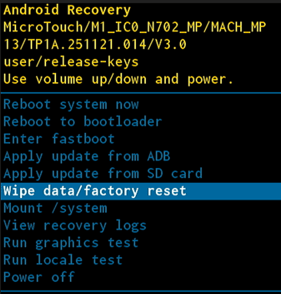
6. Confirm the Reset
Using the keyboard press the Down Arrow Key to highlight Factory data reset
Press Enter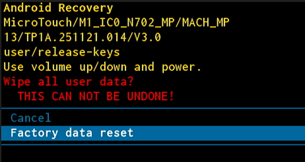
7. Reboot the Device
When Data wipe complete appears in the lower left corner
Use the Arrow Keys to select Reboot system now
Press Enter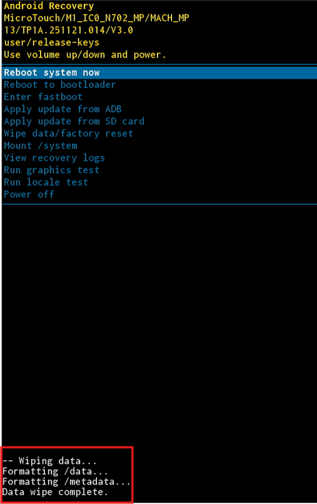
8. Disconnect the Keyboard
Once the device begins restarting, you can disconnect the USB keyboard.
Your device will boot up and begin the initial setup process.
Troubleshooting:
The factory reset feature may be unavailable due to restrictions imposed by a Mobile Device Management (MDM) system or other factors.
We are unable to determine what is preventing the feature from appearing and do not have tools to make it available.