
|
IMPORTANT: Return the defective unit in the same box and protective packaging used for the replacement unit. Return all accessories. |
|
STEP 1 | Pack the Unit
Place the IDS unit in the replacement carton using all original foam/protective packaging. Include all accessories. |
STEP 2 | Position on Pallet
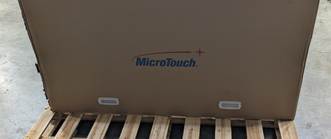
Place the carton upright and centered on the pallet. The MicroTouch logo should be upright. Nothing should extend beyond the pallet edges. |
|
STEP 3 | Route the Straps
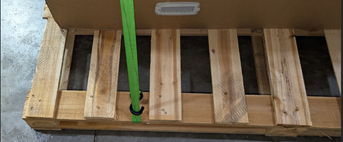
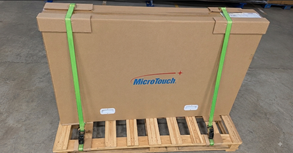
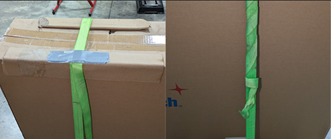
Use both supplied ratchet straps. Route them over the carton and secure them to the pallet as shown. Do not route a strap completely underneath the pallet. |
STEP 4 | Protect the Carton
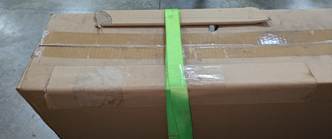
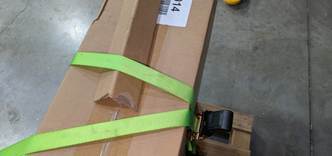
Place the thick cardboard corner protectors between each strap and the carton anywhere the strap crosses an edge. |
|
STEP 5 | Tighten Both Straps
Tighten until the straps are snug and the carton cannot shift. Do not overtighten or crush the carton. Repeat for the second strap. |
STEP 6 | Secure Loose Ends
Tape or tie all loose strap material so nothing hangs from the pallet or can be caught by a forklift or other objects during transit. |

BEFORE PICKUP: □ Carton upright & centered □ All accessories packed □ Two straps snug □ Corner protection installed □ Loose strap ends secured □ RMA number on label
WHAT NOT TO DO
Incorrect packaging can damage the IDS unit or create a freight-handling hazard.
|
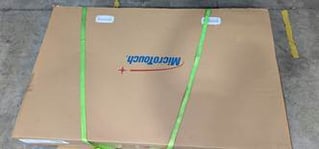
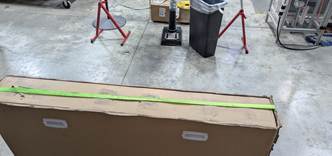
✕ DO NOT LAY THE CARTON FLAT
The IDS carton must remain upright on the pallet. |
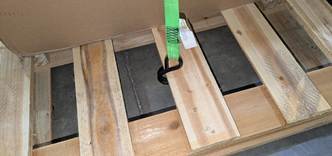
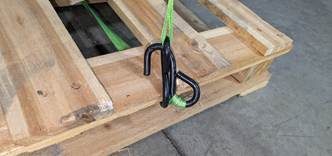
✕ DO NOT ATTACH HOOKS TO PALLET DECK BOARDS
Use the approved strap routing/anchor method shown in Step 3. |
|
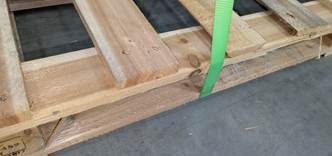
✕ DO NOT RUN STRAPS COMPLETELY UNDER THE PALLET
A strap completely under the pallet can be damaged by a forklift or break during transit from rubbing against the floor. |
✕ DO NOT TIGHTEN STRAPS WITHOUT CORRECT CORNER PROTECTION
Always use the supplied cardboard protectors where straps cross carton edges. |
|
✕ DO NOT RUN THE STRAPS PARALLEL WITH THE UNIT
Run the straps how they are shown in Step 5. |
✕ DO NOT LEAVE HOOKS OR HARDWARE EXPOSED
Keep hooks and ratchet hardware secured and positioned so they cannot snag or damage the shipment. |
If the carton can shift on the pallet, or any strap/hardware is loose or exposed, correct the packaging before carrier pickup.
If you have any questions, please reach out to support@microtouch.com